Create Your Website with Elementor: Simple Guide for Therapists
Creating a therapist Elementor website is today one of the best ways to gain visibility and reassure your future patients. Thanks to this intuitive page builder, you can launch a professional website without writing a single line of code. In this guide, we'll walk through each step to create an attractive and optimized website for your therapy practice.
Why Choose Elementor for Your Therapist Website?
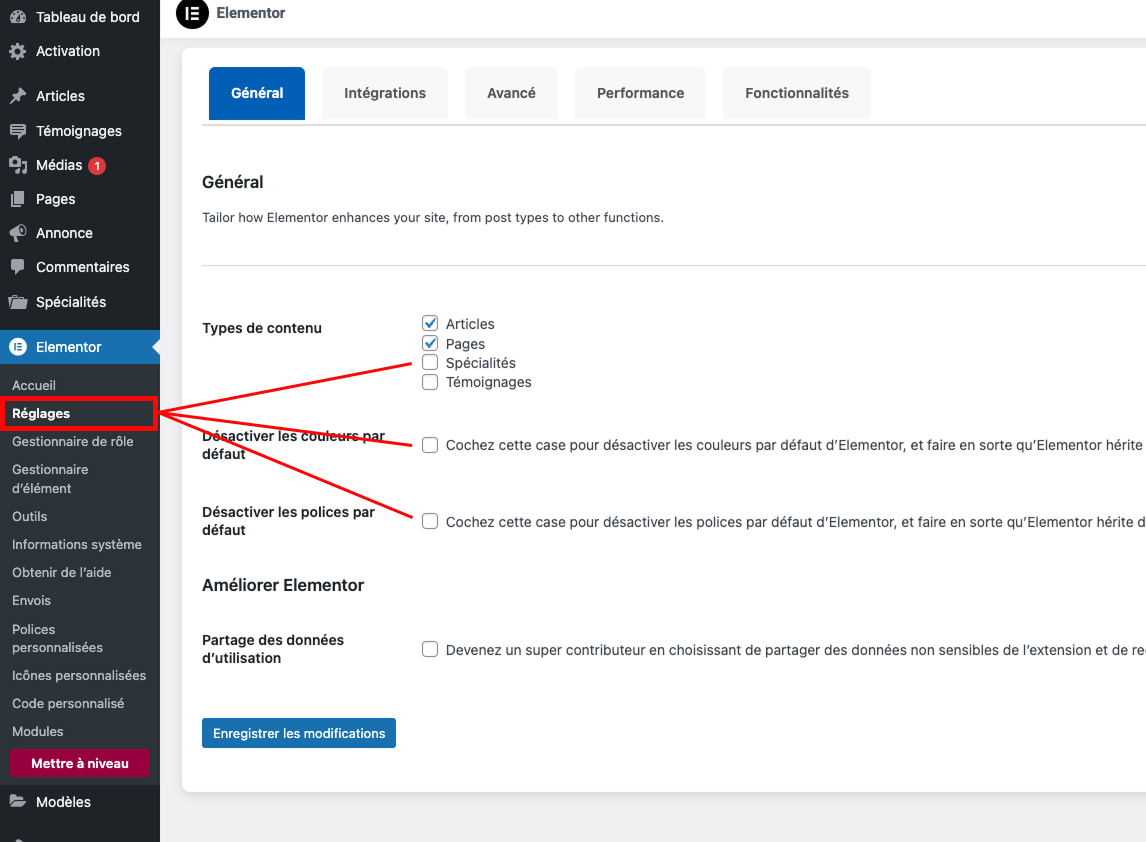
Elementor is a popular WordPress plugin that allows you to design web pages with drag-and-drop. For a therapist, having a clear and reassuring website is essential to present your approach, specialties, and fees. Using Elementor offers several advantages:
- Ease of use: even without technical knowledge, you can easily customize your pages.
- Template library: many "therapist Elementor templates" are available to get started quickly.
- Theme compatibility: Elementor works perfectly with professional themes like Vitalisite, specially designed for healthcare practitioners.
Thanks to these assets, Elementor is a wise choice for any professional wanting to get online quickly.
1. Prepare Your Project: Domain Name and Hosting
Before starting to create your therapist website, you'll need a domain name (for example "mytherapist.com") and reliable WordPress hosting. Many hosts offer one-click WordPress installations. Once your hosting is activated, you can install WordPress and start customizing your site.
Choose a Relevant Domain Name
Opt for a simple-to-remember domain name related to your activity. For example, "dr-smith-psychologist.com" or "naturopath-new-york.com". This choice contributes to your SEO and brand memorization.
Select an Appropriate Host
Favor a WordPress-specialized host for optimal performance. Remember to check security, availability (uptime), and automatic backup capability.

2. Install WordPress and Elementor
Step 1: Install WordPress
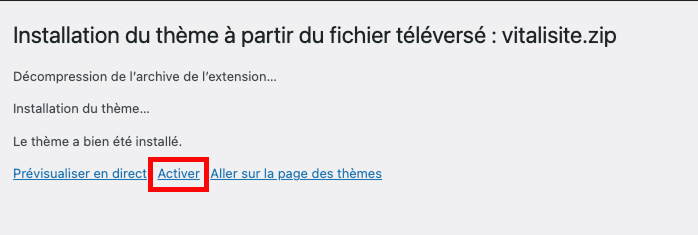
Most hosts offer an automatic installer. In a few clicks, your WordPress site is ready. Then choose a lightweight theme to ensure good performance. The Vitalisite theme is ideal for healthcare professionals: modern design, features designed for your profession, and complete integration with Elementor.
Step 2: Install the Elementor Plugin
From your WordPress dashboard, go to Plugins → Add New then search for "Elementor." Install and activate the plugin. You can then access the editor to start building your pages.
3. Structure the Essential Pages of Your Website
A therapist Elementor website should include several key pages to inspire trust and convert visitors into patients:
- Homepage: briefly presents your specialty, method, and links to your main pages.
- "About" page: detail your background, training, and values.
- "Consultations" or "Services" page: explain the types of support offered, session duration, and if you wish, your fees.
- Appointment booking page: integrate a contact form or link to Calendly/your booking system.
- Blog: regularly write articles to demonstrate your expertise and boost your SEO.
For each page, Elementor offers ready-to-use blocks (or widgets): titles, texts, images, buttons, forms... You just drag these elements to the desired area and customize their content.
4. Customize the Design with Elementor
One of Elementor's great assets is the ability to fully customize your pages' appearance. For a therapist website, a clean and reassuring design is often most effective. Here are some tips:
- Use soft colors consistent with your logo.
- Choose readable fonts.
- Space out your sections well to facilitate reading.
- Add professional photos to humanize your site (check out where to find royalty-free images).
Thanks to Elementor settings, you can modify margins, spacing, font sizes, and backgrounds without any line of code.

5. Optimize Your Site for SEO
Creating a website is a first step; your future patients still need to find you on Google. SEO optimization is therefore essential. Here are the main points to watch:
- Choose relevant titles and meta descriptions: Elementor integrates perfectly with SEO plugins like Yoast or Rank Math.
- Insert your main keyword (for example "therapist Elementor site") in your H1, first paragraphs, and at least two subtitles (H2).
- Optimize your images by filling in
alttags and compressing files. - Create internal links to other pages on your site or useful articles, like why a healthcare practitioner should have a website.
Good SEO allows you to appear in the first results when a patient searches for a therapist in your city.

6. Add Useful Features for Therapists
In addition to classic pages, you can enrich your site with tools adapted to your practice:
- Online appointment booking: Elementor Pro or certain WordPress extensions allow integrating a calendar directly on your site.
- Newsletter: stay in touch with your patients by sending them regular tips.
- Testimonials area: thanks to Elementor widgets, display positive feedback from your patients to reassure new visitors.
- Blog: share in-depth articles on your specialty. This improves your SEO and demonstrates your expertise.
All these features are easily accessible with Elementor and require no coding.
7. Save Time with Ready-to-Use Templates
If you lack inspiration or time, take advantage of therapist Elementor templates available online. These templates already contain essential sections (presentation, appointment booking, blog). You just replace texts and images with your own content. It's an excellent way to get a professional result quickly.
8. Secure and Maintain Your Site
A WordPress site must be regularly updated to stay secure. Make sure to update WordPress core, your extensions, and your theme. Check out our detailed article why and how to update your WordPress site for best practices.
Also remember to perform automatic backups. This way, in case of problems, you can restore your site in minutes.
9. Vitalisite: A WordPress Theme Dedicated to Healthcare Professionals
Creating your therapist Elementor site can sometimes seem intimidating. If you want to go faster, the Vitalisite solution is ideal. This WordPress theme specially designed for healthcare professionals includes:
- Modern and customizable designs with Elementor.
- Ready-to-use pages to present your services and take appointments.
- Support for installation and customization.
With Vitalisite, you benefit from a turnkey site, optimized for conversion and adapted to your specific needs.
Conclusion: Launch Your Therapist Elementor Website Today
As you've seen, creating a professional website with Elementor is not complicated. By following the steps in this guide, you'll quickly have an online presence that reflects your expertise. A well-built site reassures your visitors, facilitates appointment booking, and reinforces your credibility.
Don't wait any longer to showcase your activity! If you want to save time and rely on a theme designed for healthcare practitioners, discover Vitalisite. Get started now and offer your patients a clear, modern, and reassuring website.